
2 weeks ago
Multi Ledger Bookkeping Complete Guide For Businesses
Introduction
Multi Ledger Bookkeeping in LekaJhoka helps businesses manage and track financial records for multiple branches companies projects funds or business units separately while still providing a consolidated view of overall finances. Each ledger maintains its own transactions balances income expenses assets and liabilities ensuring accurate financial reporting and easier reconciliation. This allows business owners to monitor the performance of individual entities without mixing financial data.
In LekaJhoka users can create multiple ledgers and record transactions under the appropriate ledger. The software automatically organizes and categorizes entries generates financial reports and supports consolidated reporting when needed. This makes it easier for growing businesses to manage multiple operations locations or accounts efficiently improve financial transparency reduce errors and make informed business decisions based on accurate real time financial data.
What Is Multi Book Accounting?

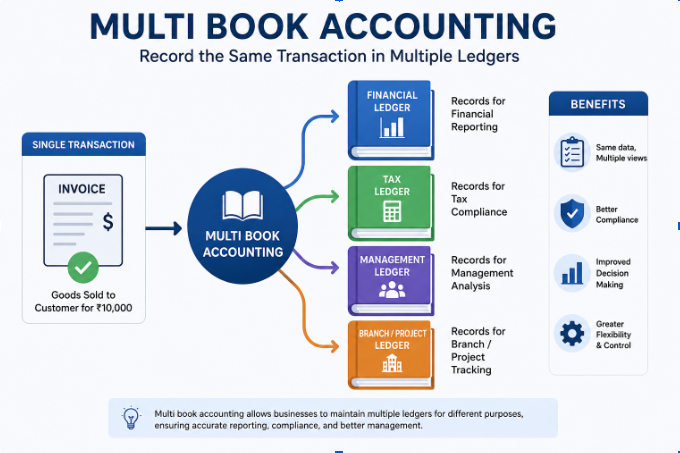
Multi book accounting sometimes called multi-ledger accounting refers to a system's ability to record the same underlying transaction into more than one ledger simultaneously or to keep entirely separate ledgers for different business units under one company umbrella. Instead of forcing every transaction through a single general ledger the software creates parallel books that can follow different rules.
Why Businesses Need More Than One Ledger

A single ledger works fine for a small, one-location business with one currency and one set of stakeholders. But once a company adds a second location, a foreign subsidiary, or a requirement to report under two accounting standards (say, local GAAP and IFRS), one ledger can't cleanly serve every need. Multi ledger bookkeeping solves this by letting each book carry its own rules while sharing the same source transactions.
Excel is useful for basic ledger management, but as the number of customers, vendors, transactions, and users grows, managing financial records becomes more difficult. LekaJhoka automates ledger management and provides better accuracy, security, and reporting capabilities.
Key Improvements Over Excel
1. Centralized Ledger Management
Instead of maintaining multiple Excel files LekaJhoka stores all customer vendor and business ledgers in one centralized system. This eliminates duplicate entries and version control issues.
2. Automatic Balance Calculation
Excel formulas can break or be modified accidentally. LekaJhoka automatically calculates
LekaJhoka simplifies financial management by automatically handling opening balances credits and debits outstanding amounts running balances and final account summaries in real time. Unlike manual Excel calculations the software accurately updates every transaction and maintains up to date ledger records for each customer supplier or business partner. This automation reduces the risk of human errors improves accounting accuracy saves valuable time and provides businesses with clear financial insights for better decision making and efficient cash flow management.
3. Multi-Party Account Tracking
Businesses handle transactions with customers suppliers vendors and partners daily. An efficient ledger management system helps track payments balances and invoices accurately automates calculations and improves cash flow management while reducing manual errors.
Customers
Suppliers
Distributors
Partners
Employees
LekaJhoka creates separate ledgers for each party while providing a consolidated view of all transactions.
4. Real-Time Reporting
Users can instantly generate ledger reports account statements outstanding balance reports payment summaries and transaction history helping businesses monitor finances and make informed decisions quickly.
Ledger reports
Outstanding reports
Payment history
Transaction summaries
Customer-wise and vendor-wise statements
No manual report preparation is required.
5. Secure Data Storage
Unlike Excel files which can be accidentally deleted corrupted or misplaced LekaJhoka provides a secure and reliable platform for managing business financial data. The software stores records in a centralized system with user access controls ensuring that only authorized users can view or modify information. Regular backup options help protect valuable financial data reducing the risk of data loss and enabling businesses to access their records safely whenever needed.
6. Faster Search and Filtering
Users can quickly search and track transactions using customer names vendor details invoice numbers payment status and specific date ranges. This advanced search functionality helps businesses locate financial records instantly monitor account activity verify payments and manage ledgers more efficiently saving time and improving overall financial management.
Customer name
Vendor name
Date range
Invoice number
Payment status
This is much faster than manually filtering Excel sheets.
How LekaJhoka Software Works
Step 1: Business Setup
The business creates its account by entering essential details such as company information financial year settings opening balances and user access permissions. This initial setup helps organize financial records efficiently and provides a strong foundation for accurate ledger management transaction tracking and financial reporting. A well configured business account ensures smooth accounting operations improved data accuracy and better control over daily financial activities.
Company details
Financial year information
Opening balances
User roles and permissions
Step 2: Create Party Accounts
Businesses can easily add and manage all important contacts including customers suppliers vendors distributors and business partners in a centralized ledger system. This helps maintain organized financial records track transactions efficiently and improve overall accounting management.
Customers
Vendors
Suppliers
Dealers
Each party receives an individual ledger account.
Step 3: Record Transactions
Users can easily record sales purchases payments received payments made credit entries and debit transactions in the ledger management system. Each transaction is automatically updated in the respective account ensuring accurate financial records real time balance tracking and efficient business accounting.
Sales invoices
Purchase invoices
Payments received
Payments made
Credit transactions
Debit transactions
The software automatically updates the respective ledger.
Step 4: Automatic Ledger Updates
When a transaction is recorded such as a sale purchase payment received or payment made the ledger is automatically updated in real time. This ensures accurate account balances reduces manual errors and helps businesses maintain up to date financial records for better accounting and reporting.
Party ledger updates instantly
Outstanding balance changes automatically
Account summaries refresh in real time
No formulas or manual calculations are needed.
Step 5: Track Receivables and Payables
Business owners can easily monitor customer payments supplier dues outstanding balances pending invoices and overall cash flow in real time. This helps improve financial management maintain accurate records and make informed business decisions for sustainable growth
Amounts to be collected from customers
Amounts payable to suppliers
Overdue payments
Pending invoices
This improves cash flow management.
Step 6: Generate Reports
The software generates accurate ledger reports customer and vendor statements outstanding balance reports cash flow summaries and financial insights in real time. These automated reports help businesses track transactions efficiently improve financial management and make informed business decisions with ease.
Ledger statements
Customer statements
Vendor statements
Outstanding reports
Cash flow reports
Financial summaries
Reports can be viewed printed or exported.
Step 7: Multi-User Access
Different departments including accounting sales management and business owners can securely access the system based on their roles and permissions. This multi user access feature improves collaboration streamlines financial management and ensures accurate real time data across the organization.
Accountant
Sales team
Management
Business owner
Permissions ensure users only access relevant information.
Common Reasons to Adopt Multiple Ledgers

Businesses that manage multiple legal entities subsidiaries franchise locations or branches often need separate financial records for accurate reporting and compliance. They may also operate in different currencies follow various tax regulations or maintain separate funds for specific purposes. A centralized ledger management system helps organize these financial operations efficiently providing clear visibility into each entity’s performance simplifying compliance and improving overall financial control.
Accounting Software for Small Business
Choosing the right accounting software is important for businesses that need multi ledger bookkeeping. When you buy multi ledger bookkeeping software for small business it is important to check whether the software supports multiple ledgers from the start. Not all accounting software includes this feature by default. Some platforms require additional features higher priced plans or third party integrations to manage multiple ledgers. Before making a purchase businesses should ensure the software can meet their accounting needs simplify financial management and support future growth.
Features to Look for in Small Business Accounting Software

When selecting a multi party ledger management solution small and medium businesses should look for software that supports multiple entities and sub ledgers automates inter company transaction matching handles multi currency accounting provides role based access controls and offers consolidated reporting. These features help improve financial accuracy streamline accounting processes enhance security and give business owners a complete view of their financial performance from a single dashboard.
Cloud vs Desktop Accounting Software Which Is Better for Your Business?
Cloud based accounting software is often the best choice for businesses managing multiple ledgers because it updates financial data in real time across different locations and users. Teams can access the latest information anytime improving collaboration and reducing errors. In contrast desktop accounting software may require manual data transfers between company files which can be time consuming and increase the risk of mistakes. For businesses looking for efficient multi ledger bookkeeping cloud accounting software offers greater flexibility accuracy and scalability.
Accounting Software Pricing Tiers Features and Costs to Compare
Many vendors gate multi ledger or multi entity functionality behind their mid tier or enterprise pricing plans. Before committing small businesses should confirm whether the feature is included standard or billed as an add on. Since this can significantly affect the total cost of ownership.
Best Multi Ledger Accounting Software for Businesses
There's no single best platform for every business the right choice depends on company size number of entities industry and budget. That said a few categories of software consistently perform well for multi ledger bookkeeping.
Enterprise Grade Platforms
Larger platforms built for complex organizations typically offer robust multi book functionality including automatic currency revaluation intercompany eliminations and configurable chart of accounts mapping across entities. These systems suit businesses managing five or more entities or handling significant cross-border transactions.
CRM Software for Lead Management Sales Tracking and Customer Growth
CRM software helps businesses manage leads, follow-ups, campaigns, contacts, proposals, and customer interactions from a single platform. It streamlines sales processes, improves customer relationship management, tracks lead progress, and helps teams convert prospects into customers more efficiently.
Small Business and Startup Tools
For smaller operations just beginning to need separate books perhaps for two related businesses or a parent company with one subsidiary lighter weight tools with class tracking location tracking or basic multi company features can be enough provided the business doesn't need heavy consolidation reporting.
Choosing Based on Integration Needs
Businesses that use point of sale (POS) systems payroll software or inventory management tools should choose accounting software that integrates seamlessly across all ledgers. Strong software integrations automatically sync financial data reduce manual data entry improve accuracy and streamline multi ledger bookkeeping. By connecting all business systems in one platform companies can save time minimize errors and maintain accurate financial records for better decision making.
Migration and Setup Support
Switching to a multi ledger system mid year can be complex. So it's worth checking whether the vendor offers migration assistance historical data import or onboarding support specifically for multi entity setups.
Multi Party Ledger Management in Excel for Accurate Tracking
Not every business is ready to invest in dedicated multi ledger software and Excel remains a common if imperfect starting point. Multi party ledger management in Excel involves building separate worksheets or tabs for each entity party or fund then linking them through formulas or a master consolidation sheet.
Setting Up a Basic Multi Ledger Excel Template
A typical setup includes one tab per ledger entity department or project a standardized chart of accounts across all tabs and a summary tab that pulls totals using formulas like SUMIF or INDEX/MATCH to consolidate figures automatically.
Best Practices for Excel Based Ledgers
To maintain accurate financial records in Excel use consistent account codes across all ledger sheets to simplify consolidation and reduce errors. Protect formula cells to prevent accidental changes maintain a version history to track updates and regularly reconcile each ledger with bank statements before combining data. Following these best practices improves financial accuracy streamlines reporting and ensures reliable multi party ledger management.
Limitations of Multi Ledger Accounting Systems Every Business Should Know
Excel based multi ledger bookkeeping can be a cost effective solution for small businesses with limited transactions. However as a business grows managing multiple ledgers in spreadsheets becomes more challenging. High transaction volumes can lead to formula errors duplicate entries version conflicts and difficulties when multiple users work on the same file. Since Excel lacks advanced audit trails and automation features many growing businesses eventually switch to dedicated ledger management software to improve accuracy efficiency collaboration and financial reporting.
How Multi Ledger Bookkeeping Works in Small and Medium Businesses

In practice small and medium businesses use Buy Multi Ledger Bookkeeping Software for Small Business to manage their finances more effectively. At first a business may use only two separate ledgers such as one for daily operating expenses and another for a specific project or grant fund. This helps keep financial records organized and easy to track.
As the business grows more ledgers can be added to manage different branches locations subsidiaries departments or currencies. This allows businesses to maintain accurate records for each area while still having a complete view of their overall financial performance.
The Day to Day Workflow
Each transaction gets tagged or coded to its relevant ledger at the point of entry whether that's a sale an expense or a payroll run. Bookkeepers then reconcile each ledger independently on a regular schedule weekly or monthly before a consolidated report is generated for leadership or investors.
Reporting and Compliance Benefits
Multi ledger bookkeeping makes it far easier to produce entity specific financial statements when required by lenders auditors or tax authorities since each ledger already stands on its own without needing to be manually separated out of a combined dataset after the fact.
Conclusion
Multi ledger bookkeeping helps businesses manage financial records accurately across multiple entities branches projects currencies or funds while maintaining a clear view of overall financial performance. As businesses grow tracking transactions through spreadsheets can become complex and time consuming. Modern multi ledger accounting software simplifies financial management by automating calculations reducing manual errors improving reconciliation and providing real time reporting. With better accuracy faster consolidation and complete audit trails businesses can make informed decisions stay compliant and scale confidently. Choosing the right multi ledger accounting solution today can save time improve efficiency and support long term business growth.